The Super Hybrid's digital cluster shows your speed, gear, battery charge, fuel and media. The images in the manual are examples only; your car's screens may look slightly different.
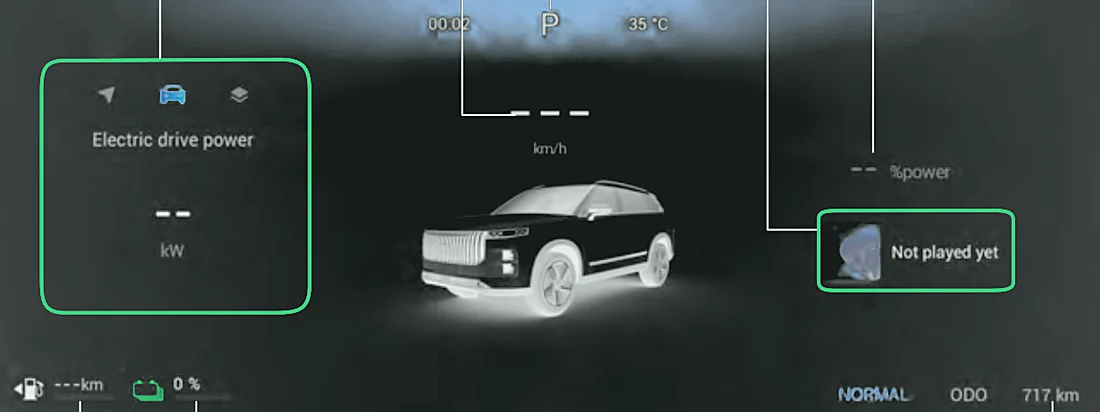
- Information display area (left) – navigation, driving information or theme pages.
- Vehicle speed (mph).
- Gear position – the gear currently selected.
- Multimedia information – the music or radio currently playing.
- Instantaneous power consumption – the electric drive power being used, as a % of the maximum available.
- Fuel level display – fuel left in the tank and the driving range on fuel.
- Power display – the remaining charge (SOC) of the high-voltage battery.
- Mileage display – distance driven (usually in miles).
Using the information display area
Use the buttons on the left steering wheel spoke (see Steering wheel buttons):
- Short press OK (○) to call up the information display area.
- Short press ◀ / ▶ to cycle between Navigation, Driving information and Theme.
- Driving information: short press ▲ / ▼ to cycle between Recent 31 miles (50 km), Since reset, Tyre pressure and Electric drive power.
- Since reset: long press OK to reset the average speed and trip mileage.
- Navigation: long press OK to show a full-screen map.
- Theme: short press ▲ / ▼ to cycle through themes, then short press OK to select one.
Changing what the cluster shows
- Battery display: choose Battery Level, Standard Mileage or Dynamic Mileage in Vehicle Center > New Energy Screen > Pure Electric Mileage Display.
- Mileage display: choose Total Distance, HEV Distance or EV Distance in Vehicle Center > New Energy Screen > Driving Distance Display.
Note:The fuel gauge may read inaccurately while you accelerate, brake hard, turn sharply or drive on a slope.
Caution:The speedometer is affected by tyre size. Only fit tyres of the original size, otherwise it will not show the correct speed.