Skip to content
JAECOOOWNERS UK

Warning lights

JAECOO dashboard warning lights

Official manufacturer dataApplies to: JAECOO 7 petrol and Super Hybrid (SHS-P), from the UK owner's manuals. Other models to follow.Last checked 11 Oct 2026

What every JAECOO 7 dashboard symbol means and what to do about it — 83 symbols from the UK owner's manuals, sorted by how urgent they are. Red means stop safely; amber or yellow means get it checked soon; green, blue and white are information.

Warning-light colours follow a simple rule. Red symbols need you to stop as soon as it is safe. Amber and yellow symbols report a fault or a system that needs attention soon. Green, blue and white symbols just confirm that something is switched on.

Some symbols only appear on the petrol JAECOO 7 and some only on the Super Hybrid (SHS-P) — use the filter to see the ones for your car. Each entry is a plain-English rewrite of the owner's manual, and the symbols are shown as they appear in the manual.

If a red warning light comes on while driving, stop when safe and consult your handbook or call JAECOO roadside assistance. JAECOO 5, E5 and 8 symbols will be added once their handbooks are indexed.

What the source doesn't tell us (yet)

  • JAECOO 5, E5 and 8 owner's handbooks are not indexed yet — their symbols can differ from the JAECOO 7.

From the JAECOO 7 owner's manuals

JAECOO 7 warning lights

All 83 dashboard symbols for the petrol and Super Hybrid JAECOO 7, grouped by how urgent they are. Filter by powertrain or colour, or search for a symbol.

Full JAECOO 7 handbook →

83 of 83 symbols

Stop safely (6)

Stop as soon as it is safe, switch off and get help. Continuing to drive may be dangerous or cause serious damage.

  • Brake system warning symbol

    Brake system warning

    RedSafety

    The brake fluid level is low or there is a fault in the brake system. This is a serious warning – the manual says the vehicle needs inspecting immediately.

    What to do

    • Check the brake fluid level and top it up if it is below the MIN mark.
    • If the cause is unclear, go to an authorised Jaecoo service centre immediately for inspection and repair.
    • If the ABS warning light is also on, park in a safe place away from traffic and contact an authorised Jaecoo service centre immediately.
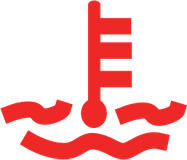
  • High coolant temperature symbol

    High coolant temperature

    RedEngine

    The engine coolant temperature is too high.

    What to do

    • Drive to a safe place and stop.
    • Let the engine idle for several minutes, then switch the vehicle power OFF.
    • Contact an authorised Jaecoo service centre immediately for inspection and repair.
  • Low engine oil pressure symbol

    Low engine oil pressure

    RedEngine

    The engine oil pressure is too low.

    What to do

    • Drive to a safe place and stop.
    • Contact an authorised Jaecoo service centre immediately for inspection and repair.
  • High voltage insulation – serious symbol

    High voltage insulation – serious

    RedHybridSuper Hybrid only

    The insulation of the high voltage system has deteriorated seriously.

    What to do

    • Stop in a safe place.
    • Contact an authorised Jaecoo service centre immediately for inspection and repair.
    • Never touch high voltage (orange) cables or components.
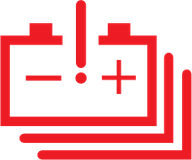
  • Power battery fault symbol

    Power battery fault

    RedHybridSuper Hybrid only

    The high voltage power battery system has a fault.

    What to do

    • Stop in a safe place.
    • Contact an authorised Jaecoo service centre immediately for inspection and repair.
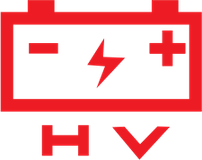
  • High voltage system fault symbol

    High voltage system fault

    RedHybridSuper Hybrid only

    The power battery, electric drive and/or charging system has a fault.

    What to do

    • Stop in a safe place.
    • Contact an authorised Jaecoo service centre immediately for inspection and repair.

Check soon (37)

A fault or a system that needs attention. Read what to do, and have it checked by a JAECOO dealer if it stays on.

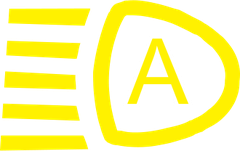
  • Intelligent headlight control fault symbol

    Intelligent headlight control fault

    YellowLights

    The automatic (intelligent) headlight function has a fault.

    What to do

    Have the vehicle checked by an authorised Jaecoo service centre as soon as possible.

  • Low washer fluid symbol

    Low washer fluid

    AmberOther

    The windscreen washer fluid level is low. On the Super Hybrid this light is fitted only on some vehicles (if equipped), and a message may also appear on the instrument cluster.

    What to do

    Top up the washer fluid reservoir as soon as you can.

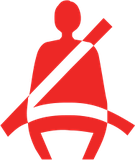
  • Front seat belt reminder symbol

    Front seat belt reminder

    RedSafety

    The driver's and/or front passenger's seat belt is not buckled, or not fastened properly.

    What to do

    Make sure everyone in the front has their seat belt fastened correctly before driving.

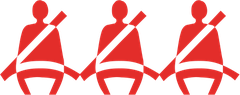
  • Rear seat belt reminder symbol

    Rear seat belt reminder

    RedSafety

    Shows the status of each rear seat belt. A seat symbol lights red when that seat belt is not fastened and goes out once it is fastened.

    What to do

    Ask rear passengers to fasten their seat belts properly before you drive.

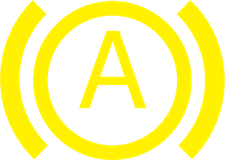
  • Electric parking brake fault symbol

    Electric parking brake fault

    YellowSafety

    The electric parking brake (EPB) system has a fault.

    What to do

    Drive slowly to an authorised Jaecoo service centre for inspection and repair as soon as possible.

  • AUTO HOLD fault symbol

    AUTO HOLD fault

    YellowSafety

    The AUTO HOLD system has a fault.

    What to do

    Drive slowly to an authorised Jaecoo service centre for inspection and repair as soon as possible.

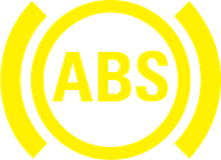
  • ABS warning symbol

    ABS warning

    YellowSafety

    The anti-lock braking system (ABS) has a fault.

    What to do

    • Drive slowly to an authorised Jaecoo service centre for inspection and repair as soon as possible.
    • If the brake system warning light is on at the same time, park in a safe place away from traffic and contact an authorised Jaecoo service centre immediately.
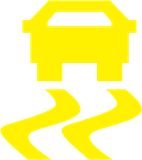
  • Electronic Stability Program (ESP) symbol

    Electronic Stability Program (ESP)

    YellowSafety

    Flashing means ESP is actively working to keep the vehicle stable – for example on a slippery road. Staying on steadily means the ESP system has a fault.

    What to do

    • If it flashes: ESP is working – this is normal.
    • If it stays on: contact an authorised Jaecoo service centre for inspection and repair as soon as possible.
  • Airbag (SRS) warning symbol

    Airbag (SRS) warning

    RedSafety

    The airbag (SRS) system has a fault. It also stays on after the seat belt pretensioners have fired.

    What to do

    Contact an authorised Jaecoo service centre for inspection and repair as soon as possible.

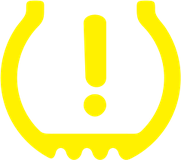
  • Tyre pressure warning (TPMS) symbol

    Tyre pressure warning (TPMS)

    YellowSafety

    A tyre's pressure is too low or its temperature is too high (above 85°C). The affected wheel flashes on the cluster with its current reading. The light also comes on if the system stops receiving a signal from one or more tyre sensors.

    What to do

    • Check the tyre pressures and inflate to the specified value as soon as possible.
    • If it is a high temperature warning, stop driving as soon as it is safe and let the tyres cool naturally – never pour cold water on a hot tyre.
    • A low pressure warning clears after driving above 15 mph for a while once the pressure is correct; a high temperature warning clears once the tyre is below 80°C.
    • If the pressures are correct but the light stays on, contact an authorised Jaecoo service centre as soon as possible.
  • Power steering (EPS) fault symbol

    Power steering (EPS) fault

    RedSafety

    Stays on when there is a fault in the electric power steering (EPS) system.

    What to do

    Contact an authorised Jaecoo service centre for inspection and repair. The manual says any malfunction light that stays on after start-up needs checking immediately.

  • Steering angle not initialised symbol

    Steering angle not initialised

    AmberSafety

    The electric power steering has not been initialised or calibrated. This typically happens after the 12V battery has been disconnected and reconnected, and the light flashes.

    What to do

    • With the vehicle running, turn the steering wheel fully to the left and then fully to the right.
    • The light should go out once the angle has been reset.
    • If it stays on, contact an authorised Jaecoo service centre.
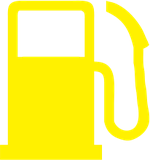
  • Low fuel symbol

    Low fuel

    YellowEngine

    The fuel tank is nearly empty.

    What to do

    Refuel as soon as possible.

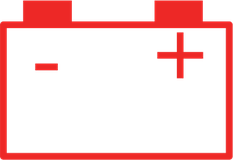
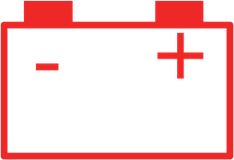
  • Charging system (12V battery) symbol

    Charging system (12V battery)

    RedEngine

    Shows the condition of the charging system. It should come on briefly when you switch the vehicle power to ON. If it doesn't come on then, or it comes on after the engine has started, there is a problem.

    What to do

    Contact an authorised Jaecoo service centre for inspection and repair as soon as possible.

  • EPC (engine power control) fault symbol

    EPC (engine power control) fault

    YellowEngine

    There is a fault in the engine system.

    What to do

    Contact an authorised Jaecoo service centre immediately for inspection and repair.

  • Engine malfunction (check engine) symbol

    Engine malfunction (check engine)

    YellowEngine

    The engine has a fault.

    What to do

    Contact an authorised Jaecoo service centre immediately for inspection and repair.

  • Transmission fault symbol

    Transmission fault

    YellowEngine

    There is a fault in the transmission (gearbox) system.

    What to do

    Contact an authorised Jaecoo service centre immediately for inspection and repair.

  • Particulate filter (PPF/GPF) full symbol

    Particulate filter (PPF/GPF) full

    GreenEngine

    The petrol particulate filter (called GPF in the Super Hybrid manual, if equipped) is full of soot and needs to regenerate (clean itself).

    What to do

    • Avoid letting the engine idle for long periods.
    • When it is safe and legal, drive at a higher speed – the manual suggests at least 37 mph (60 km/h) – until the light goes out.
    • Don't stop or idle over dry leaves, grass or anything flammable: the exhaust gets very hot and could start a fire.
  • Particulate filter (PPF/GPF) fault symbol

    Particulate filter (PPF/GPF) fault

    AmberEngine

    The particulate filter has a fault, or the soot it has collected has reached its limit.

    What to do

    Contact an authorised Jaecoo service centre for inspection and repair as soon as possible.

  • Idle stop-start unavailable / fault symbol

    Idle stop-start unavailable / fault

    AmberEnginePetrol only

    Steady on means stop-start is switched off, or the conditions for a safe automatic restart aren't met, so the engine won't stop. Flashing means the stop-start system has a fault.

    What to do

    • Steady: no action needed.
    • Flashing: contact an authorised Jaecoo service centre for inspection and repair as soon as possible.
  • AWD fault symbol

    AWD fault

    AmberEnginePetrol only

    The all-wheel drive (AWD) system has a fault. Only AWD versions have this light.

    What to do

    Contact an authorised Jaecoo service centre for inspection and repair as soon as possible.

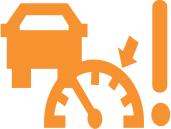
  • AEB fault symbol

    AEB fault

    YellowDriver Assist

    The automatic emergency braking (AEB) system has a fault, so it may not help you in an emergency.

    What to do

    Contact an authorised Jaecoo service centre for inspection and repair as soon as possible.

  • Hill descent control fault symbol

    Hill descent control fault

    AmberDriver Assist

    The hill descent control system has a fault.

    What to do

    Drive slowly to an authorised Jaecoo service centre for inspection and repair as soon as possible.

  • Blind spot alert (level 2) symbol

    Blind spot alert (level 2)

    AmberDriver Assist

    Flashing: the blind spot monitoring system has given a second-level alert – a vehicle is in your blind spot and you have switched on the indicator on that side. An alarm also sounds.

    What to do

    Take care: a vehicle is in your blind spot on the side you are indicating. The system is only an aid and may not work in all conditions.

  • Blind spot monitoring fault symbol

    Blind spot monitoring fault

    AmberDriver Assist

    The blind spot monitoring system has a fault and may not warn you.

    What to do

    Contact an authorised Jaecoo service centre for inspection and repair as soon as possible.

  • Adaptive cruise fault symbol

    Adaptive cruise fault

    AmberDriver Assist

    The adaptive cruise control system has a fault.

    What to do

    Contact an authorised Jaecoo service centre for inspection and repair as soon as possible.

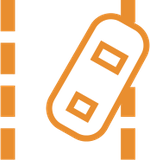
  • Lane departure warning fault symbol

    Lane departure warning fault

    AmberDriver Assist

    The lane departure warning system has a fault.

    What to do

    Contact an authorised Jaecoo service centre for inspection and repair as soon as possible.

  • Emergency lane keeping fault symbol

    Emergency lane keeping fault

    AmberDriver Assist

    The emergency lane keeping system has a fault.

    What to do

    Contact an authorised Jaecoo service centre for inspection and repair as soon as possible.

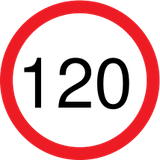
  • Overspeed alarm symbol

    Overspeed alarm

    RedDriver AssistPetrol only

    Comes on with three beeps when you exceed the overspeed alarm value you set (the number shows the set value). The alarm and its value are set in the vehicle settings.

    What to do

    Pay attention to your speed.

  • Driver fatigue symbol

    Driver fatigue

    AmberDriver Assist

    The driver monitoring system thinks you may be tired and reminds you to take a rest.

    What to do

    Take a rest.

  • Hands-off steering wheel warning symbol

    Hands-off steering wheel warning

    AmberDriver AssistPetrol only

    Appears with an alarm sound when you take your hands off the steering wheel while driving.

    What to do

    Put your hands back on the steering wheel straight away.

  • General warning (safety warning light) symbol

    General warning (safety warning light)

    AmberOther

    One of the vehicle's systems has a fault. Look for a message on the instrument cluster explaining which one.

    What to do

    Contact an authorised Jaecoo service centre for inspection and repair as soon as possible.

  • Service due symbol

    Service due

    AmberOther

    The vehicle is due for maintenance (a service).

    What to do

    Book the vehicle in with an authorised Jaecoo service centre as soon as possible.

  • Charging/discharging system symbol

    Charging/discharging system

    RedHybridSuper Hybrid only

    Shows the condition of the charging/discharging system. If it doesn't come on when the vehicle is powered on, or stays on after the vehicle has started, there is a problem.

    What to do

    Contact an authorised Jaecoo service centre for inspection and repair as soon as possible.

  • High voltage insulation warning symbol

    High voltage insulation warning

    AmberHybridSuper Hybrid only

    The insulation of the high voltage system has deteriorated.

    What to do

    • Contact an authorised Jaecoo service centre immediately for inspection and repair.
    • Never touch high voltage (orange) cables or components.
  • Power battery low symbol

    Power battery low

    AmberHybridSuper Hybrid only

    The high voltage power battery is low.

    What to do

    Charge the vehicle as soon as possible.

  • Power battery seriously discharged symbol

    Power battery seriously discharged

    RedHybridSuper Hybrid only

    The high voltage power battery is seriously discharged.

    What to do

    Charge the vehicle as soon as possible.

Information (40)

Tells you a feature is on or working. No action is usually needed.

  • Daytime running lights symbol

    Daytime running lights

    GreenLights

    Shows that the daytime running lights are on. It comes on when the vehicle is started.

    What to do

    No action needed.

  • Position (side) lights symbol

    Position (side) lights

    GreenLights

    Shows that the position lights (side lights) are switched on.

    What to do

    No action needed. Before leaving the vehicle or parking for a long time, make sure the light switch is turned off, or the 12V battery may go flat and the vehicle may not start.

  • Turn signal / hazard indicators symbol

    Turn signal / hazard indicators

    GreenLights

    The left or right arrow flashes when you use that indicator. When the hazard warning light switch is on, both arrows flash together.

    What to do

    No action needed. The indicator stalk returns to the centre automatically as you straighten up after a turn (it may not after only a slight turn of the wheel).

  • High beam symbol

    High beam

    BlueLights

    Comes on when the high beam (main beam) headlights are on, or while you flash them.

    What to do

    No action needed.

  • Front fog lights symbol

    Front fog lights

    GreenLights

    Shows that the front fog lights are switched on. On the Super Hybrid, front fog lights are fitted only on some vehicles (if equipped).

    What to do

    Obey local regulations on the use of fog lights.
  • Rear fog light symbol

    Rear fog light

    YellowLights

    Shows that the rear fog light is switched on.

    What to do

    Obey local regulations on the use of fog lights.

  • Intelligent headlight control (IHC) symbol

    Intelligent headlight control (IHC)

    WhiteLights

    Shows that the automatic (intelligent) headlight function is switched on and working.

    What to do

    No action needed.

  • Electric parking brake (EPB) symbol

    Electric parking brake (EPB)

    RedSafety

    Steady on means the electric parking brake is applied. It may flash briefly during sudden, hard braking – this is normal. If it flashes at any other time, the EPB system has a fault.

    What to do

    If it flashes when you are not braking hard, contact an authorised Jaecoo service centre as soon as possible.

  • AUTO HOLD active symbol

    AUTO HOLD active

    GreenSafety

    Shows that AUTO HOLD is currently holding the vehicle stationary for you.

    What to do

    Press the accelerator to drive away as normal.

  • ESP OFF symbol

    ESP OFF

    YellowSafety

    The Electronic Stability Program (ESP) has been switched off, so it will not help to keep the vehicle stable.

    What to do

    Switch ESP back on for normal driving. While ESP is off, many driver assistance functions (such as ACC, AEB and the lane systems) are not available.
  • Engine warming up symbol

    Engine warming up

    BlueEngine

    The engine coolant is still cold and the engine is warming up. The light goes out once the coolant has warmed up.

    What to do

    No action needed.
  • Idle stop-start ready symbol

    Idle stop-start ready

    GreenEnginePetrol only

    Shows that the conditions for the idle stop-start system are met, so the engine can switch off automatically when you stop.

    What to do

    No action needed.

  • ECO mode symbol

    ECO mode

    GreenOther

    Shows that ECO (economy) drive mode is selected.

    What to do

    No action needed.

  • NORMAL mode symbol

    NORMAL mode

    BlueOther

    Shows that NORMAL drive mode is selected.

    What to do

    No action needed.

  • SPORT mode symbol

    SPORT mode

    RedOther

    Shows that SPORT drive mode is selected.

    What to do

    No action needed.

  • SNOW mode symbol

    SNOW mode

    BlueOtherPetrol only

    Shows that SNOW drive mode is selected (AWD models).

    What to do

    No action needed.

  • MUD mode symbol

    MUD mode

    AmberOtherPetrol only

    Shows that MUD drive mode is selected (AWD models).

    What to do

    No action needed.

  • SAND mode symbol

    SAND mode

    YellowOtherPetrol only

    Shows that SAND drive mode is selected (AWD models).

    What to do

    No action needed.

  • OFF-ROAD mode symbol

    OFF-ROAD mode

    AmberOtherPetrol only

    Shows that OFF-ROAD drive mode is selected (AWD models).

    What to do

    No action needed.
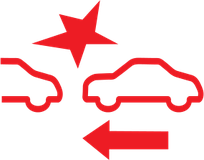
  • Automatic emergency braking (AEB) symbol

    Automatic emergency braking (AEB)

    RedDriver Assist

    Shows that the automatic emergency braking (AEB) system is operating.

    What to do

    Be ready to take over: after AEB brakes the vehicle to a stop it does not keep holding it stationary. AEB is only an aid – you must stay in control of the vehicle.
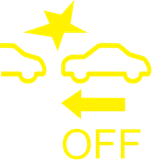
  • AEB OFF symbol

    AEB OFF

    YellowDriver AssistPetrol only

    The automatic emergency braking (AEB) function has been switched off.

    What to do

    AEB is on by default. You can switch it back on in the audio system settings.

  • Hill descent control symbol

    Hill descent control

    GreenDriver Assist

    Shows that hill descent control is operating.

    What to do

    No action needed, but be ready to take over control of the speed at any time – HDC can switch itself off (for example if it overheats).
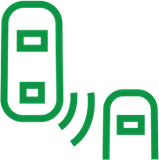
  • Blind spot alert (level 1) symbol

    Blind spot alert (level 1)

    GreenDriver Assist

    Steady on: the blind spot monitoring system has given a first-level alert – something has been detected in your blind spot.

    What to do

    No action needed. The system is only an aid and may not work in all conditions.
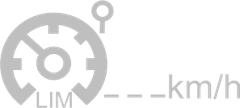
  • Speed limiter standby symbol

    Speed limiter standby

    GreyDriver Assist

    The active speed limiter is switched on but in standby (pre-limiting) and is not yet limiting your speed.

    What to do

    Set a speed limit to start limiting.
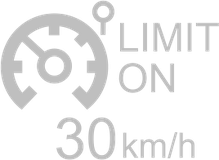
  • Speed limiter active symbol

    Speed limiter active

    GreyDriver Assist

    The active speed limiter is limiting your speed. The set limit is shown next to the symbol.

    What to do

    No action needed.

  • Cruise control standby symbol

    Cruise control standby

    GreenDriver AssistPetrol only

    Flashing: cruise control is in standby (pre-cruise) and is not controlling your speed yet.

    What to do

    Set a speed to start cruising, or keep driving normally.
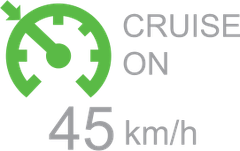
  • Cruise control active symbol

    Cruise control active

    GreenDriver AssistPetrol only

    Steady on: cruise control is active and holding the set speed shown.

    What to do

    No action needed.
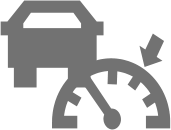
  • Adaptive cruise standby symbol

    Adaptive cruise standby

    GreyDriver Assist

    Adaptive cruise control (ACC) is in standby (pre-cruise) and is not controlling your speed yet.

    What to do

    Set a speed to start adaptive cruise.

  • Adaptive cruise active symbol

    Adaptive cruise active

    GreenDriver Assist

    Adaptive cruise control (ACC) is active and controlling your speed and distance to the vehicle ahead.

    What to do

    Keep your hands on the wheel and be ready to brake – ACC is an aid only.
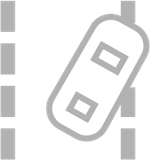
  • Lane departure warning on / limited symbol

    Lane departure warning on / limited

    WhiteDriver Assist

    The lane departure warning system is switched on, or its operation is currently restricted (for example, it can't detect the lane).

    What to do

    No action needed.
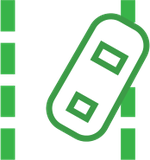
  • Lane departure warning standby / active symbol

    Lane departure warning standby / active

    GreenDriver Assist

    Steady on means lane departure warning is in standby and ready. Flashing means it is actively warning you that the vehicle is leaving its lane.

    What to do

    If it flashes, the vehicle is crossing a lane line. The system is only an aid – you must stay in control and steer as needed.
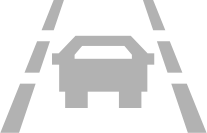
  • Emergency lane keeping on / limited symbol

    Emergency lane keeping on / limited

    GreyDriver Assist

    The emergency lane keeping (ELK) system is switched on, or its operation is currently restricted.

    What to do

    No action needed.

  • Emergency lane keeping standby symbol

    Emergency lane keeping standby

    GreenDriver Assist

    The emergency lane keeping (ELK) system is in standby and ready to help.

    What to do

    No action needed.
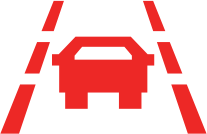
  • Emergency lane keeping active symbol

    Emergency lane keeping active

    RedDriver Assist

    The emergency lane keeping (ELK) system is active – it is intervening to help keep the vehicle in lane.

    What to do

    The system is only an aid – you must stay in control of the vehicle and steer as needed.

  • READY symbol

    READY

    GreenHybridSuper Hybrid only

    Steady on means the vehicle is in READY state and can drive off. The electric motor is silent, so the car may feel switched off even though it will move.

    What to do

    Always shift to P before you get out or lock the vehicle.

  • EV mode symbol

    EV mode

    GreenHybridSuper Hybrid only

    The vehicle is in EV mode: it drives on electric power only and the engine does not start.

    What to do

    No action needed. When the battery gets too low the car switches to HEV mode automatically.

  • EV+ mode symbol

    EV+ mode

    GreenHybridSuper Hybrid only

    The vehicle is in EV+ mode. It lets the battery discharge further than EV mode for a longer electric-only range.

    What to do

    Use EV+ only in an emergency – reducing deep discharges helps look after the battery.

  • HEV mode symbol

    HEV mode

    GreenHybridSuper Hybrid only

    The vehicle is in HEV (hybrid) mode. The engine starts and stops automatically to help drive the car or generate power as needed.

    What to do

    No action needed.

  • Charging cable connected symbol

    Charging cable connected

    RedHybridSuper Hybrid only

    Steady on means a charging connector (charging gun) is connected to the vehicle.

    What to do

    Unplug the charging connector before you drive away.

  • Discharging connector connected symbol

    Discharging connector connected

    BlueHybridSuper Hybrid only

    Steady on means a discharging connector (for powering external appliances) is connected.

    What to do

    Unplug the discharging connector when you have finished.