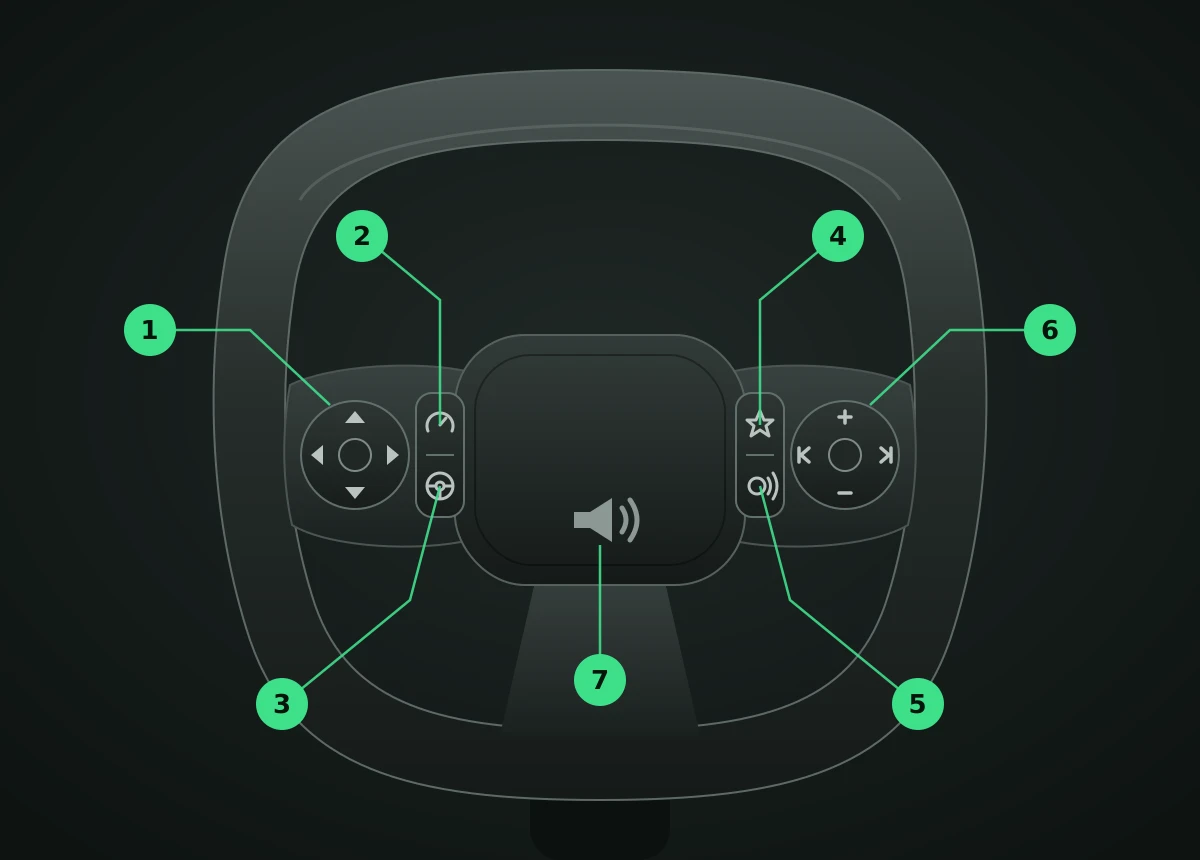
The steering wheel has a button pad on each spoke. The left spoke controls the instrument cluster and cruise/driver assistance. The right spoke controls audio, phone and voice. The horn is in the centre pad.
Left spoke – cluster and cruise
A four-way pad with a centre OK button sits towards the outside (rim side) of the spoke. Two buttons sit in a column nearer the centre of the wheel, split by a line.
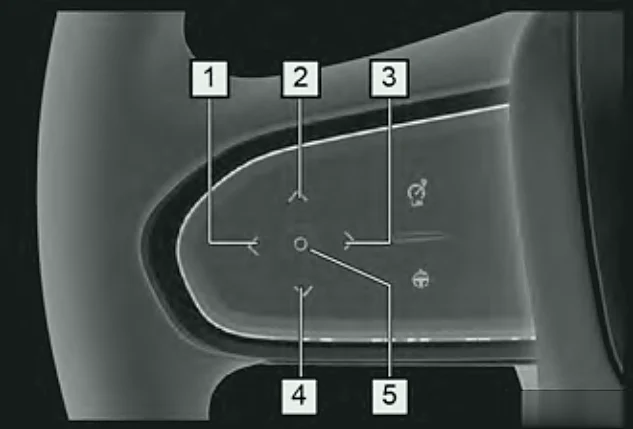
- ▲ Up – cluster: move up / change page. With cruise: resume ACC, or raise the set speed of ACC or the active speed limiter (press = +1 mph, hold = bigger steps).
- ▼ Down – cluster: move down / change page. With cruise: set the current speed and start ACC (or the speed limiter), or lower the set speed.
- ◀ Left – cluster: move left / change page. With ACC on: shorten the following distance.
- ▶ Right – cluster: move right / change page. With ACC on: lengthen the following distance.
- ○ OK (centre) – enter or exit the cluster menu and confirm selections. On the Super Hybrid, long press it to reset trip data (on the Since reset page) or to show a full-screen map.
- Speed limiter button (upper of the two buttons nearer the centre, speedometer symbol) – turns the active speed limit (ASL) on or off.
- ACC button (lower button, steering wheel symbol) – short press turns adaptive cruise control on or off; long press switches between ACC and the TJA/ICA lane-centring mode.
Note:The cluster buttons only operate the display when cruise control is not switched on. When cruise is on, ▲ ▼ ◀ ▶ control cruise speed and following distance instead.
Right spoke – audio, phone and voice
A four-way pad with a centre button sits towards the outside (rim side) of the spoke. A star button and a voice button sit in a column nearer the centre of the wheel.
- Vol+ (▲ / speaker +) – turn the volume up.
- Vol− (▼ / speaker −) – turn the volume down.
- ◀ Previous – previous track (music) or previous station (radio). During a call: hang up.
- ▶ Next – next track (music) or next station (radio). For an incoming call: answer.
- ○ Centre – short press to pause music or radio.
- ☆ Star (custom) button (upper button nearer the centre) – you choose what it does in Vehicle Centre > Vehicle Settings > Steering wheel button customisation.
- Voice button (lower button, face/speech symbol) – short press for the car's voice assistant; long press for Siri or CarLife phone voice control (phone must be connected).
Other uses
- Mirror adjustment: when the Rear mirror adjustment screen is open on the touchscreen, the steering wheel buttons move the door mirror glass.
- Horn: press the centre pad near the horn symbol.
Note:Available buttons and functions vary with trim. Please refer to your actual car.