The car has automatic climate control with separate driver and front passenger temperatures. Most controls are on the touchscreen; a few physical buttons sit on the centre console.
Opening the climate screen
- Swipe up from the bottom of the touchscreen, or
- tap the climate button on the bottom bar, or
- press a climate button on the console panel.
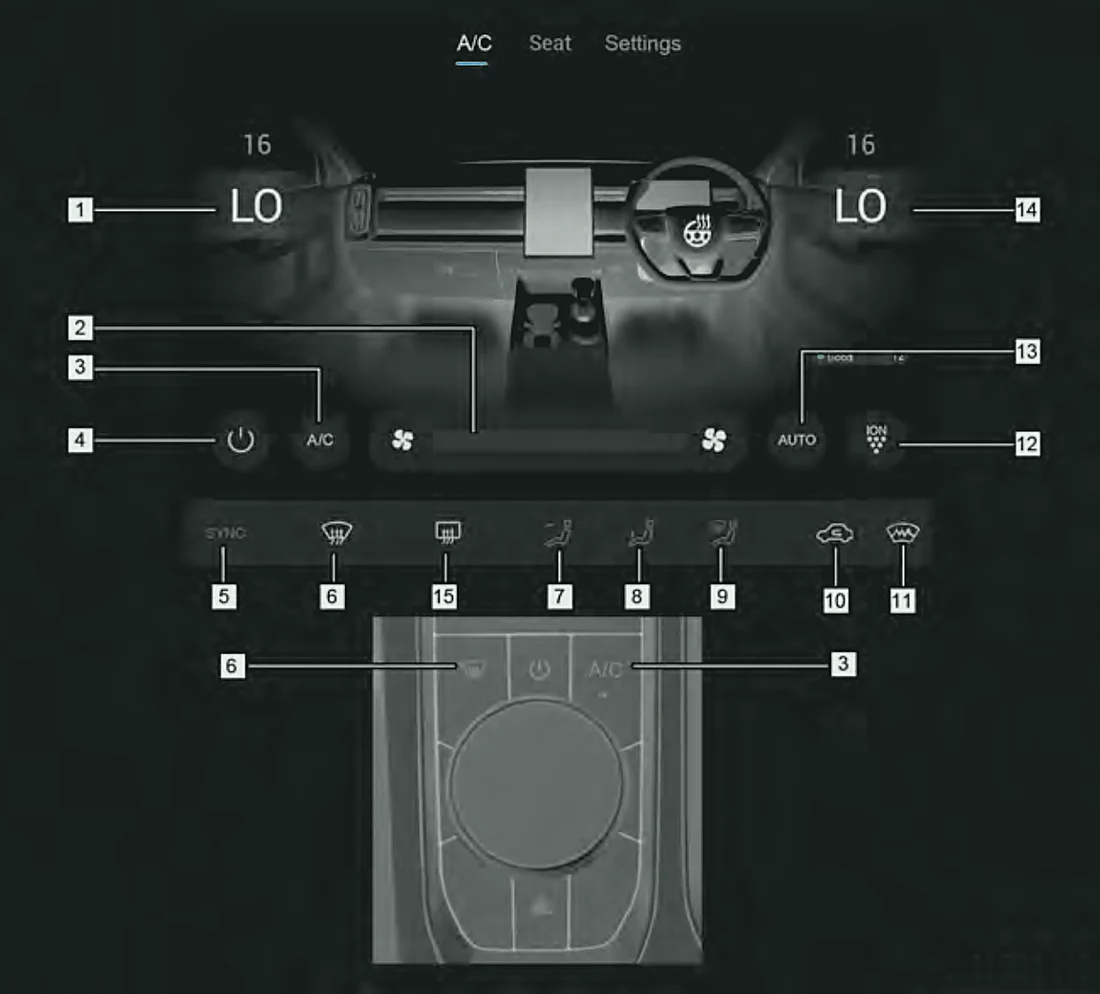
| No. | Control |
|---|---|
| 1 | Front passenger temperature |
| 2 | Fan speed |
| 3 | A/C button |
| 4 | Power button |
| 5 | SYNC button |
| 6 | Front windscreen demist/defrost button |
| 7 | Rear window / door mirror demist button |
| 8 | Face mode button |
| 9 | Foot mode button |
| 10 | Defrost mode button |
| 11 | Outside/recirculated air button |
| 12 | Air purification button |
| 13 | AUTO button |
| 14 | Driver temperature |
Super Hybrid (SHS-P) only
Note:Buttons differ depending on your car's specification.
Basic controls
- Power button – turns the climate system on or off.
- Fan speed – adjust how much air comes out.
- A/C button – turns cooling (the compressor) on. The indicator is lit when the compressor is on and goes out when it is off.
- Outside/recirculated air button – indicator on = recirculated air; indicator off = fresh outside air.
- Temperature – set the driver and passenger sides with the LO/HI controls.
Use recirculated air:
- in dusty areas,
- to keep out smells from outside,
- to stop exhaust fumes coming in,
- to cool or heat the cabin quickly.
Caution:Do not leave the climate system running longer than necessary when the engine is off, or the battery may run flat.