The centre touchscreen (the head unit) runs the audio, phone, apps, climate and vehicle settings. A bar of shortcut buttons runs along the bottom of the screen.
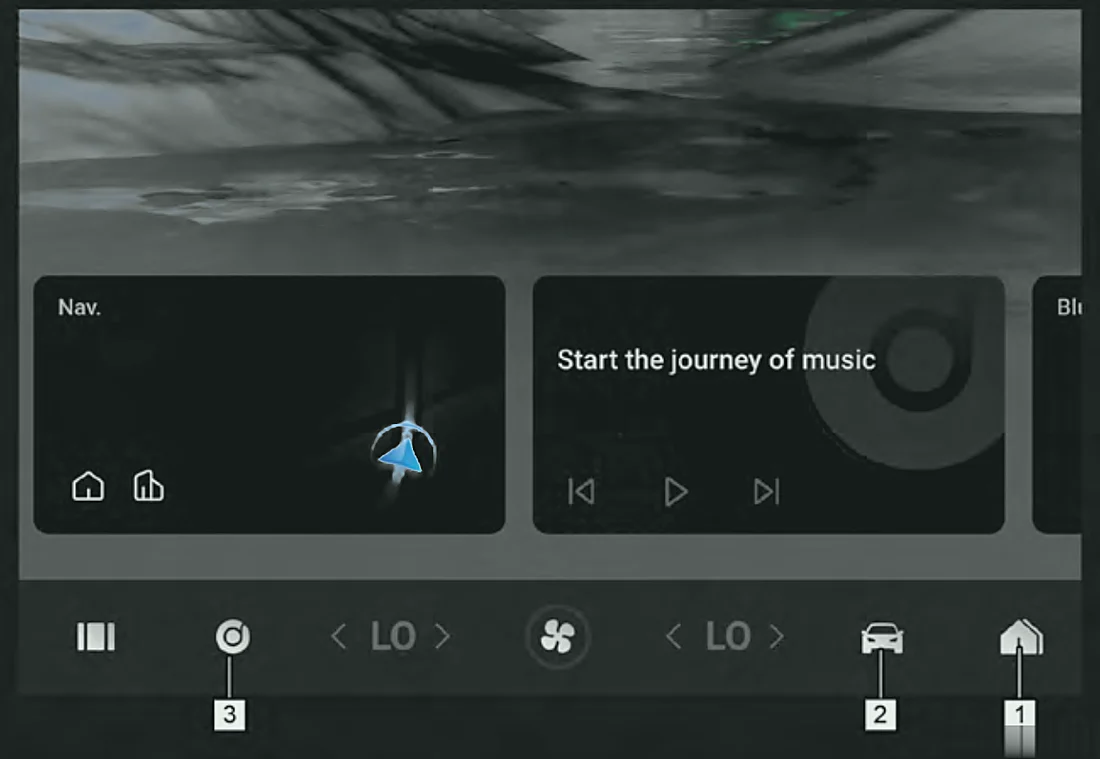
- Home page button – tap to go to the main screen. Tap it again to open the vehicle applications screen.
- Vehicle setting button – tap to open the Vehicle Centre, where you change the car's settings.
- Multimedia button – tap to open the media screen: DAB radio, music, pictures, video and Bluetooth calls.
- Petrol only
- Home page button – tap to go to the main screen. Tap it again to open the vehicle applications screen.
- Vehicle setting button – tap to open the Vehicle Centre, where you change the car's settings.
- AVM button (button 3) – tap to open the panoramic (360°) camera screen. Press and hold it to set other functions.
- Super Hybrid (SHS-P) only
Note:To switch the audio system on or off, press the power button on the centre console (auxiliary fascia console).Petrol only
Note:The radio supports RDS.Petrol only
Note:Some radios support DAB.Super Hybrid (SHS-P) only
Note:The buttons shown differ depending on your car's specification.
Note:The temperature (LO/HI) and fan icons in the same bar open the climate controls – see Climate Controls Overview.