When you stop (at traffic lights, for example), idle stop-start switches the engine off, then restarts it automatically when you need to move. This saves fuel and cuts emissions and noise. Air conditioning, brakes and the audio system keep working. Sometimes the system pauses itself for safety or comfort – this is normal, and it comes back when conditions allow.
Switching it on or off
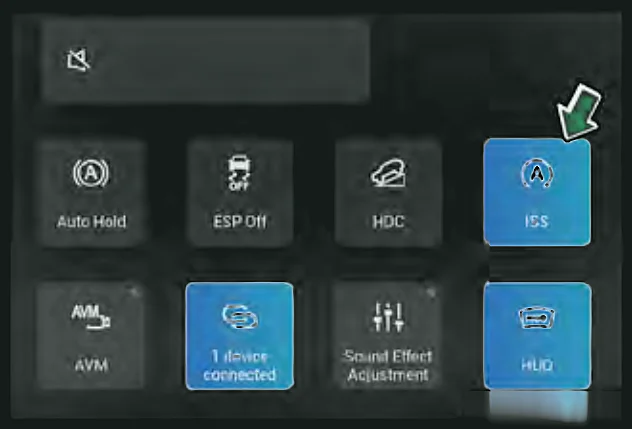
- 1With the car in ON, swipe down from the top-right edge of the central screen.
- 2Tap the idling stop-start switch (shown as ISS) to turn the system off. Tap again to turn it on.
Note:The car remembers your last choice the next time you start it.
Note:Stop-start is off by default in Snow, Mud, Sand and Off-road modes.
Cluster indicators

Green: conditions met / engine auto-stopped

Yellow steady: system off or not safe to restart automatically. Yellow flashing: fault
Note:If the system decides it isn't safe to restart automatically (for example, you open a door while the engine is stopped), the yellow indicator comes on and the cluster shows "Start engine manually". Start the engine yourself – there's nothing wrong with the system.
Note:Lots of stop-starts in a short time can overheat the starter. Auto-stop is then disabled for a while to protect it. This isn't a fault – it returns by itself once the starter has cooled.