Driver's power seat
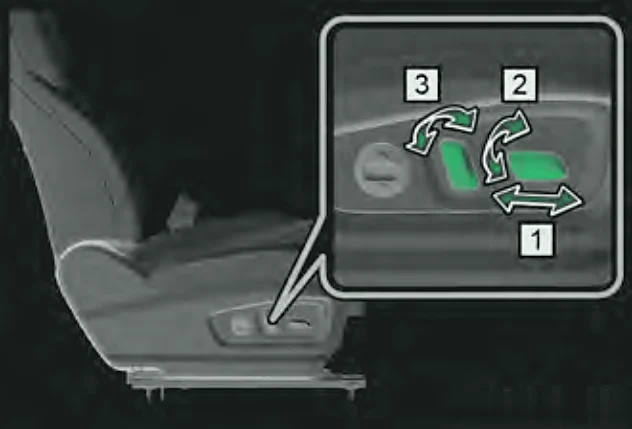
- Forwards/backwards – slide the whole switch forwards or backwards.
- Height (driver only) – move the rear end of the switch up or down.
- Backrest angle – move the top of the backrest switch forwards or backwards.
You can also adjust the seat from the touchscreen: switch the car ON (Super Hybrid: READY) and go to Vehicle Centre > Vehicle comfort. A seat screen also pops up after you adjust the seat.
Lumbar support
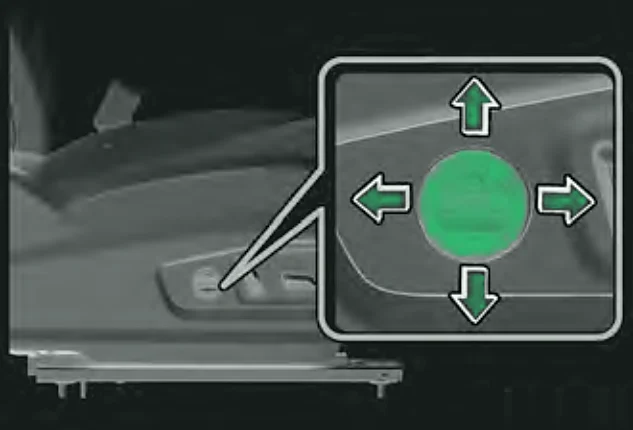
Press and hold the four-way lumbar switch (if equipped on the petrol model):
- Up – more support for the upper back, less for the lower back.
- Down – more support for the lower back, less for the upper back.
- Forwards – more overall lumbar support.
- Backwards – less overall lumbar support.
Note:Lumbar support has an end stop. Release the switch when it reaches the limit.
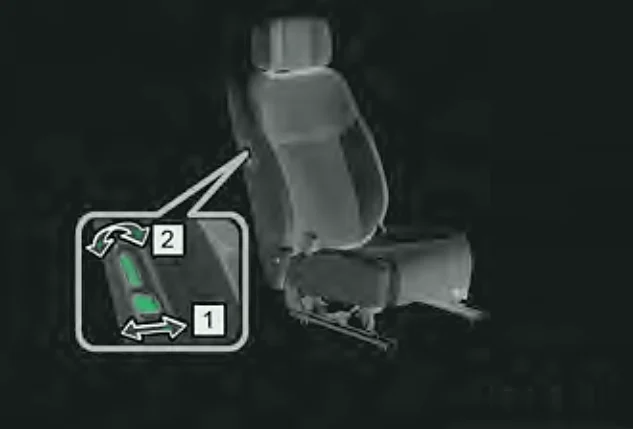
Front passenger 'boss' button
If equipped, the driver can adjust the passenger seat with a switch on the passenger seat side:
Adjustment range
| Adjustment | Range from design position |
|---|---|
| Forwards/backwards (total 240 mm) | 200 mm forward, 40 mm back |
| Driver's seat height (total 60 mm) | 40 mm up, 20 mm down |
| Backrest (design angle 25°) | 30° forward, 50° back |
Caution:Do not put anything under a seat while it is moving – it will damage the seat.
Warning:Never adjust a seat while driving. Do not recline the backrest more than necessary – seat belts protect best when you sit slightly reclined and well back.