The parking sensors in the front and rear bumpers detect obstacles and how far away they are. The touchscreen and warning tones help you park.
Turning them on
- Select R - the sensors switch on automatically, or
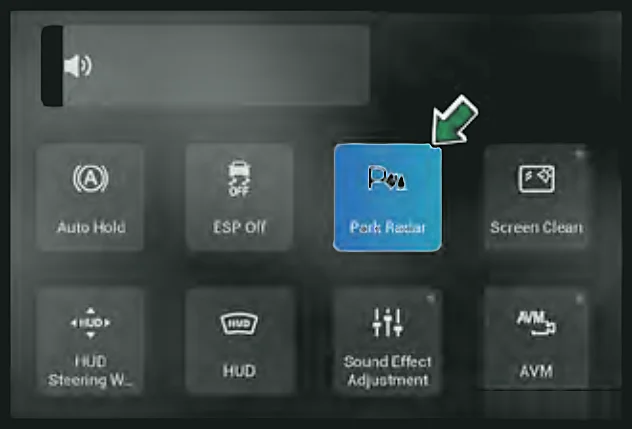
- Swipe down from the top right of the touchscreen and tap Park Radar. Tap it again to switch off (when not in R).
The car must be switched on (ON mode).Petrol only
The car must be in READY.Super Hybrid (SHS-P) only
Each time the system starts and is working normally, it beeps for 0.5 seconds, the status indicator lights and detection begins.Petrol only
Each time the system starts and is working normally, the status indicator lights and detection begins.Super Hybrid (SHS-P) only
What you see and hear
When a sensor detects an obstacle, the screen shows the distance in red, yellow and green zones, with warning tones. If several sensors detect obstacles, all distances are shown and the tone follows the nearest one.
Speed and gear behaviour
- Driving forwards above 9 mph (15 km/h), the front and rear sensors stop working. They do not switch back on when you slow below 9 mph - use the Park Radar button.
- Once you have selected R, the sensors keep working when you move to other gears (whether or not you switched them on first).
- With the front sensors on, applying the parking brake or selecting P shows the distance arcs only, without tones.
- Petrol only
- With the front sensors on, applying the parking brake shows the distance arcs only, without tones.
- Super Hybrid (SHS-P) only
Note:The distance measured is the shortest straight-line distance between the obstacle and the sensor.
Note:If there is a fault, a long tone sounds for 2 seconds and a fault message stays on screen until it is fixed.
Caution:The sensors do not warn about obstacles outside their detection range. While manoeuvring, watch that the other side of the car does not get close to obstacles.